
How to sell tutoring services with

How to sell tutoring services?
Marketplace Storefront – Get an online store built in Oases and
published to your website
0
Oases Marketplace Storefront – How to sell tutoring services
Oases MarketPlace Storefront is a white-label website store that you create in your Oases database to build your online tutoring services. As a result, Oases will give you code to publish to your website, showing you how to sell tutoring services from your online store.
There are five main components to the MarketPlace Storefront and you can use one or more. That is to say, any combination of the following:
1
Storefront
How to sell tutoring services with
Oasis Marketplace storefront
Sell Hours
The simplest transaction on your Oases website store would be your online tutoring services which allows you to sell tutoring hours to your new or existing customers. For example, they could buy five hourly sessions or a package of five hours as required. In other words, you set up how you want the time to be sold.
Book Tutor
You can send your tutors to display on one or multiple storefronts, displaying a photo, bio and a calendar for instant bookings.
To make sure your tutors get plenty of notice of a booking from your online store, you can set buffers and parameters.
Sell a Session
You can create a session in Oases on a planned day and time and set it to be for sale on your Storefront.
Existing or new customers can buy onto the session.
Sell a Course
Just like selling a single session if you have a course of sessions such as a test-prep intensive or a week of Camp, send these to your Marketplace storefront for sale.
Additionally, set a maximum number of attendees for your online tutoring services and when the class is full, the package will no longer be listed on your website store.
2
Interface
Bookings
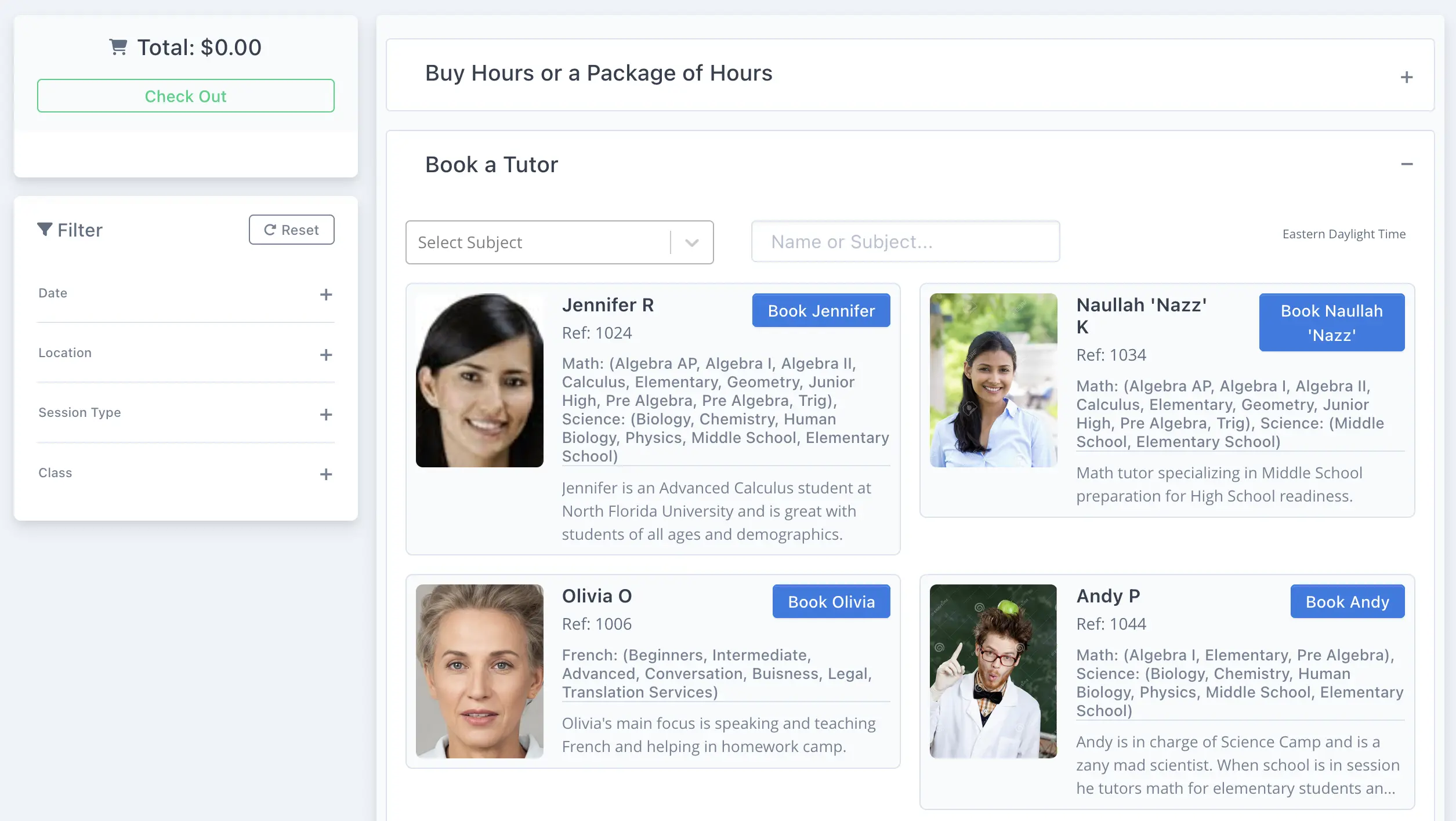
Your customers will find it easy to filter tutors and book a session. What’s more you and the tutor will be notified of any new booking.
3
Login
Accounts
Your new customers can create a login when purchasing or booking through your marketplace storefront. Furthermore, you can add a webform to capture the exact information you need, from new customers.
Additionally, existing customers can use their login to access your website store via their login.
Login
It’s your store on your website selling your online tutoring services. Therefore, it will be a white label experience for your customers accessing their accounts.
4
Tracking
Notification
Both the purchaser and your team will receive a notification when a purchase is made.
Most importantly, you can edit and style the email template to your customer.
Invoices
So, you use a combination of marketplace and in-house scheduling! How can you tell the difference?
For example, to help you spot invoices created by Marketplace they have an MP code for easy filtering and tracking. Therefore, you will always know if the invoice was created by your team or your customer.
Filtering
The session list and calendar may be filtered to sessions booked with tutors via you marketplace storefront website store.
Furthermore, the session itself contains the invoice number. Consequently, you always know when you are viewing a session your customer booked with a tutor.
5
Video
Press Play
Frequently Asked Questions
How does Oases help tutoring businesses attract and capture new students?
Oases automates lead capture through WebForms embedded on your website, which automatically create complete client and student records in your system the moment a form is submitted — no manual data entry required. You can also build a branded MarketPlace Storefront where new clients can book tutoring hours, purchase packages, or register for camps directly from your site.
What email and SMS marketing tools does Oases provide for tutoring companies?
Oases includes built-in mass email and SMS tools that allow you to send targeted promotions, automated follow-ups, bulk announcements, and personalized appointment or payment reminders. All communication history is stored in the platform so your team always has context for every client relationship. You can also sync with MailChimp for more sophisticated drip campaigns.
Does Oases include tools to manage the sales pipeline from inquiry to enrollment?
Yes. Oases includes a smart tagging system to categorize and segment leads, task management to assign and track follow-up activities for each inquiry, and e-signature contracts that can be sent and signed directly from the platform. Every signed document is automatically stored in the client record, keeping your team organized and your pipeline moving.
Can Oases help with retaining existing tutoring clients, not just acquiring new ones?
Yes. Oases helps with retention through automated session reminders, a parent portal where families stay informed with schedule updates and progress reports, personalized follow-up messaging, and bulk outreach tools for re-engagement campaigns. Keeping families informed and engaged helps reduce churn and builds long-term relationships.
How does Oases integrate with external marketing tools like MailChimp?
Oases syncs your student and customer database with your MailChimp lists automatically. New records created in Oases can be sent to MailChimp, and updates to existing records (such as email address changes or status changes) trigger updates in MailChimp too. This keeps your marketing lists accurate and can fire MailChimp Automations without any manual maintenance.
So What’s Next?
Still have questions? Learn more about Oases tutoring management system, call us at +1-866-327-0035 or:
How does Oases help tutoring businesses attract and capture new students?
Oases automates lead capture through WebForms embedded on your website, which automatically create complete client and student records in your system the moment a form is submitted — no manual data entry required. You can also build a branded MarketPlace Storefront where new clients can book tutoring hours, purchase packages, or register for camps directly from your site.
What email and SMS marketing tools does Oases provide for tutoring companies?
Oases includes built-in mass email and SMS tools that allow you to send targeted promotions, automated follow-ups, bulk announcements, and personalized appointment or payment reminders. All communication history is stored in the platform so your team always has context for every client relationship. You can also sync with MailChimp for more sophisticated drip campaigns.
Does Oases include tools to manage the sales pipeline from inquiry to enrollment?
Yes. Oases includes a smart tagging system to categorize and segment leads, task management to assign and track follow-up activities for each inquiry, and e-signature contracts that can be sent and signed directly from the platform. Every signed document is automatically stored in the client record, keeping your team organized and your pipeline moving.
Can Oases help with retaining existing tutoring clients, not just acquiring new ones?
Yes. Oases helps with retention through automated session reminders, a parent portal where families stay informed with schedule updates and progress reports, personalized follow-up messaging, and bulk outreach tools for re-engagement campaigns. Keeping families informed and engaged helps reduce churn and builds long-term relationships.
How does Oases integrate with external marketing tools like MailChimp?
Oases syncs your student and customer database with your MailChimp lists automatically. New records created in Oases can be sent to MailChimp, and updates to existing records (such as email address changes or status changes) trigger updates in MailChimp too. This keeps your marketing lists accurate and can fire MailChimp Automations without any manual maintenance.
So What’s Next?
Still have questions? Learn more about Oases tutoring management system, call us at +1-866-327-0035 or:
Book your demo time now
Use our online booking system to pick a time for a no commitment demonstration that suits you. Quick and easy!
Book a DemoOverview Pages
Sales & Marketing Tools
Scheduling & Tracking Tools
Accounting Tools